Projects


All projects

Money Melody Game...
Money Melody Game App
Background
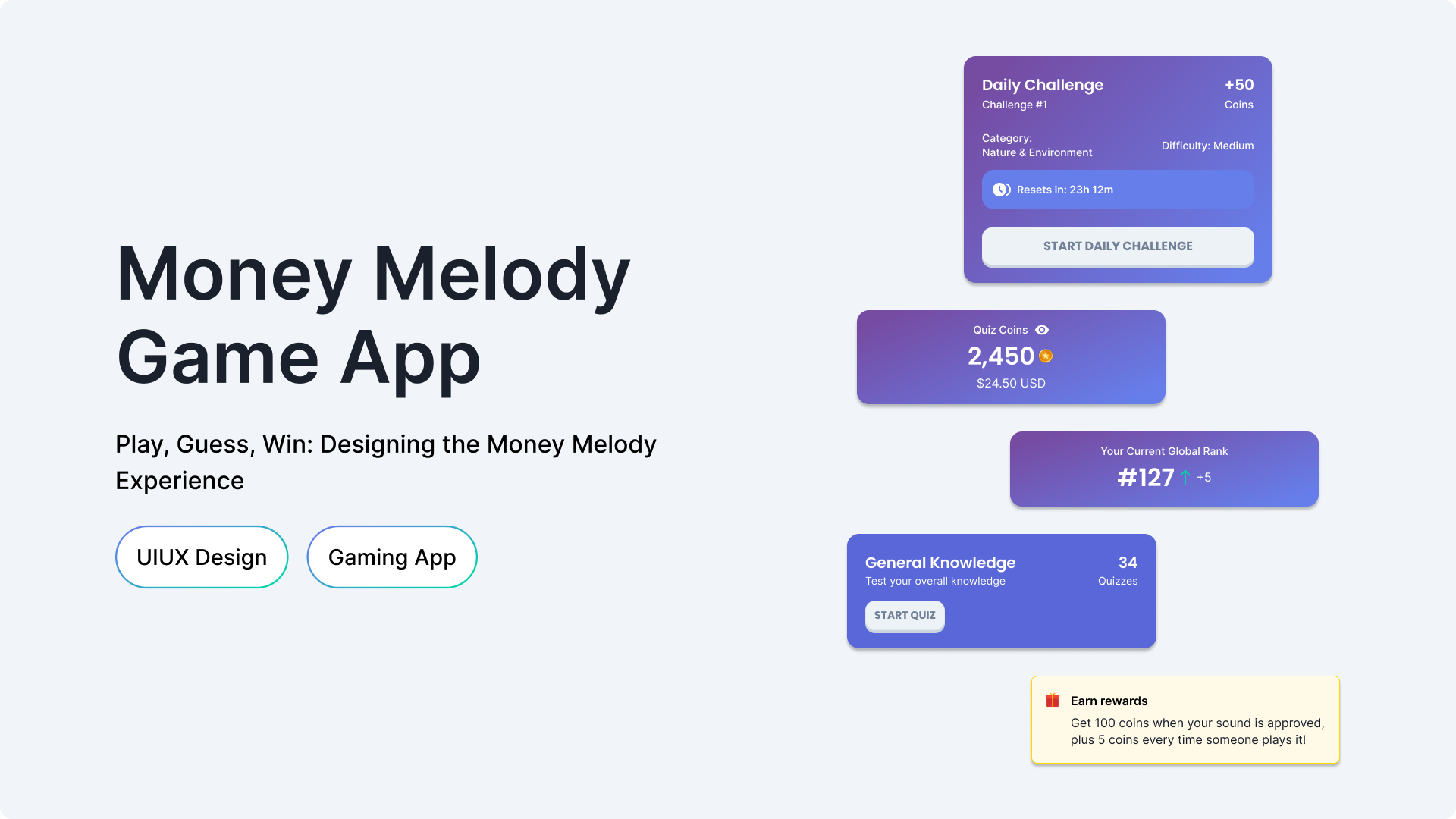
Money Melody is a gamified mobile app that combines sound-guess challenges and category-based quizzes, allowing users to earn virtual coins and withdraw real cash rewards.
The client provided a detailed requirement specification.
My role was to translate them into a visual UI identity that aligns with their vision of a fun and trustworthy reward-based app
Design Strategy
The goal was to make Money Melody feel like a fun, modern gaming app suited for users aged 12 and above.
- Colors: Inspired by gaming interfaces, I used teal tones and blue gradients for a vibrant feel.
- Typography: I chose Poppins for headers and Inter for body text to keep the design clean and readable.
- Buttons & CTAs: Filled buttons with a subtle drop shadow (Y: 4) to create a tactile, game-like interaction.
Variables Set-up
I began by setting up primitives for the defined branding - styles, colors, sizes, and spacing tokens.
From these, I built complex variables such as color schemes, typography scales, component spacing, and layout grids.
This structure allowed me to:
- Quickly adjust branding and layout when the client requested changes.
- Ensure smooth developer handoff, since every variable was named and categorized for implementation.
Prototype
Here’s the prototype for Money Melody app, showing the main user flows
User Flows Designed
Flow 1: Onboarding
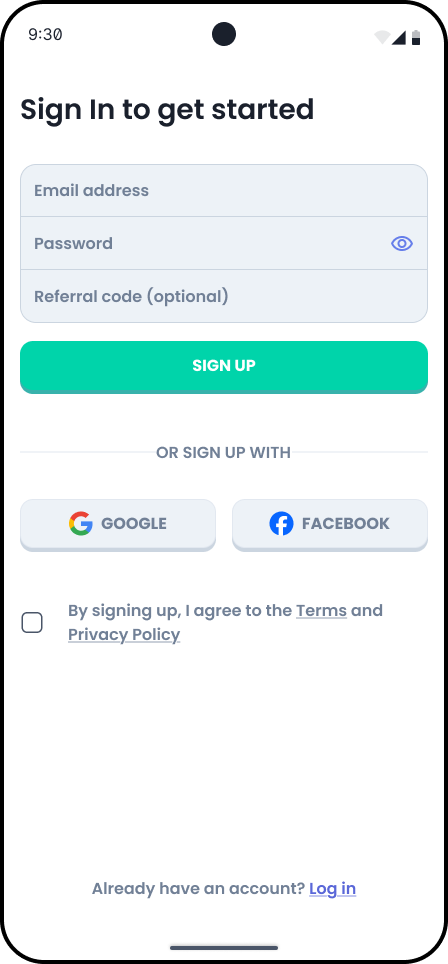
- Splash screens → Brief overview showing users what to expect from the app.
- Sign Up / Login → Access via email, Google, or Facebook options
- Password reset → Flow with clear states (input → confirmation → success).
- Profile setup → optional set-up of user’s image, username, connect with friends, notifications and sound categories selection.
Flow 2: Sound Challenges
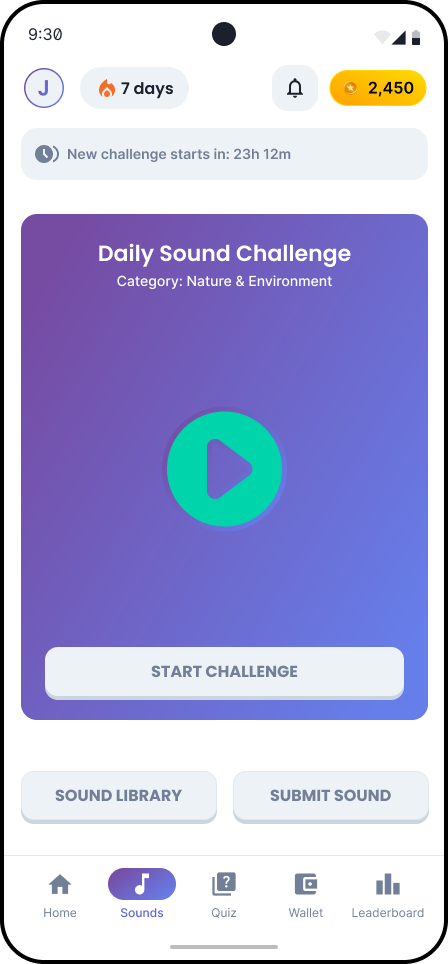
- Sound Home → Browse daily challenges and sound library
- Daily Challenge Start → Introduction to today's mystery sound
- Sound Playback → Listen to audio (up to 3 plays)
- Answer Selection → Choose between text input or MCQ
- Hint System (Optional) → Watch ad for clues
- Result & Explanation → See if correct, learn about the sound
- Coins Earned → Receive reward (50 base, 30 with hints, 10 consolation)
Flow 3: Quiz Challenges
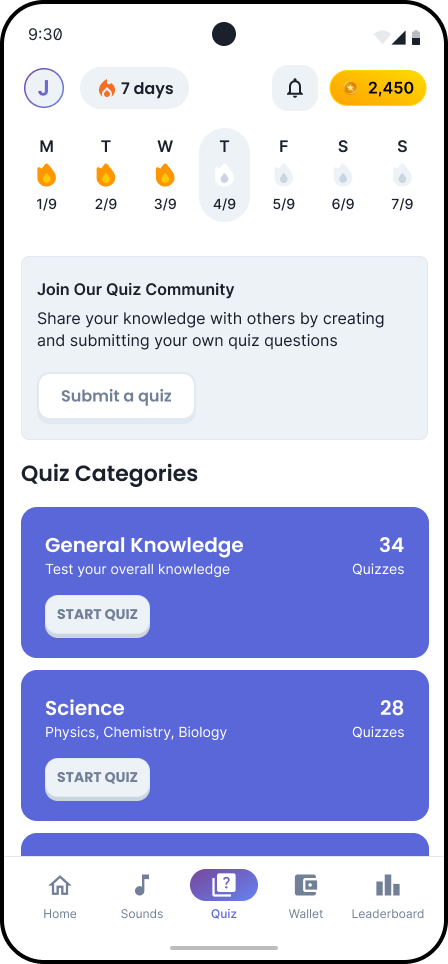
- Quiz Home → View streak, submit a quiz, and categories
- Category Selection → Pick from available study categories
- Quiz Start → See quiz details (questions)
- Question Loop → Answer MCQ with 30s timer per question
- Progress Through Quiz → Track completion (1/10, 2/10, etc.)
- Results Summary → Score, breakdown, correct/incorrect answers
- Rewards & Level Up → Earn coins, XP, maintain streak
Flow 4: Wallet
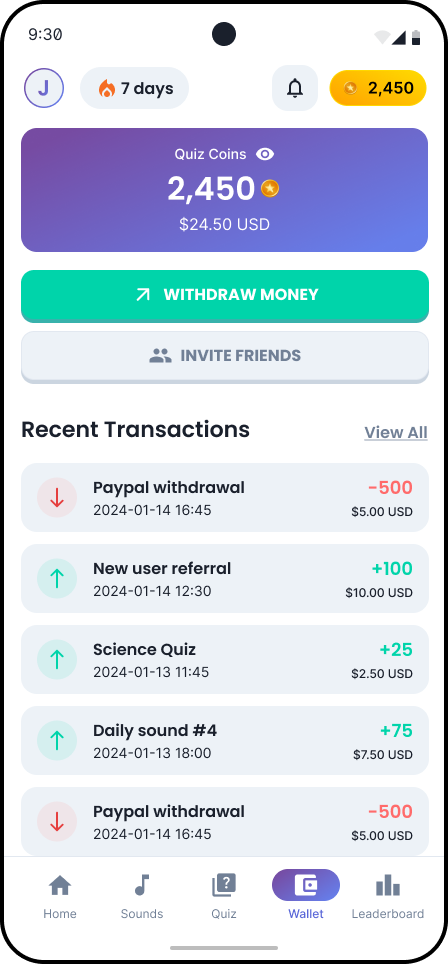
- Wallet Home → Current balance, transaction history
- View Transactions → Detailed earning/spending log
- Referral → Invite friends and earn 50 coins for each who joins using the code
- Withdrawal Options → Choose payment method (PayPal, Gift Cards)
- Enter Amount → Input withdrawal amount (minimum threshold)
Flow 5: Leaderboard
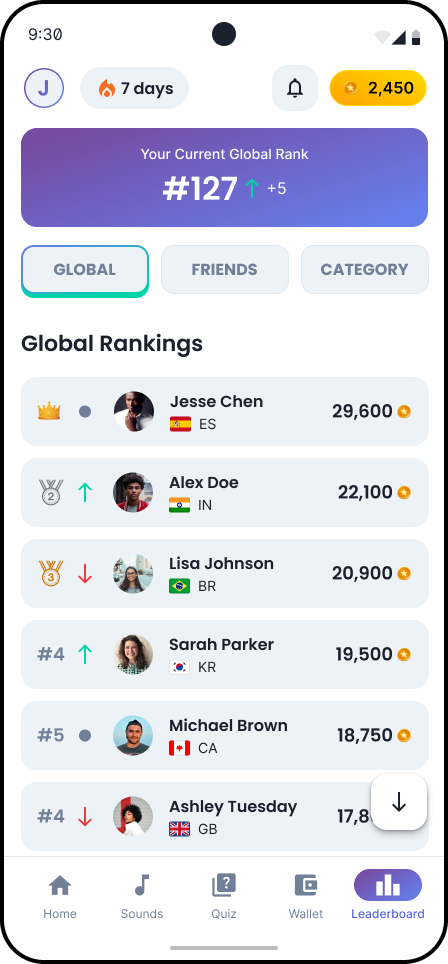
- Leaderboard Home → Rankings view
- Filter Options → Switch between Global/Friends/Category
- View Rankings → See top players, their stats
- Your Rank → Highlighted position in current view
Conclusion
Thank you for taking the time to explore the journey process in designing the app.

Go back to all projects
Let’s work together, reach out and I’ll get back to you soon!

Send email

Resume


Projects

Back to All projects
Money Melody Game App
Money Melody Game App
Background
Money Melody is a gamified mobile app that combines sound-guess challenges and category-based quizzes, allowing users to earn virtual coins and withdraw real cash rewards.
The client provided a detailed requirement specification. My role was to translate them into a visual UI identity that aligns with their vision of a fun and trustworthy reward-based app
Design Strategy
The goal was to make Money Melody feel like a fun, modern gaming app suited for users aged 12 and above.
- Colors: Inspired by gaming interfaces, I used teal tones and blue gradients for a vibrant feel.
- Typography: I chose Poppins for headers and Inter for body text to keep the design clean and readable.
- Buttons & CTAs: Filled buttons with a subtle drop shadow (Y: 4) to create a tactile, game-like interaction.
Variables Set-up
I began by setting up primitives for the defined branding - styles, colors, sizes, and spacing tokens.
From these, I built complex variables such as color schemes, typography scales, component spacing, and layout grids.
This structure allowed me to:
- Quickly adjust branding and layout when the client requested changes.
- Ensure smooth developer handoff, since every variable was named and categorized for implementation.
Prototype
Here’s the prototype for Money Melody app, showing the main user flows
User Flows Designed
Flow 1: Onboarding
- Splash screens → Brief overview showing users what to expect from the app.
- Sign Up / Login → Access via email, Google, or Facebook options
- Password reset → Flow with clear states (input → confirmation → success).
- Profile setup → optional set-up of user’s image, username, connect with friends, notifications and sound categories selection.
Flow 2: Sound Challenges
- Sound Home → Browse daily challenges and sound library
- Daily Challenge Start → Introduction to today's mystery sound
- Sound Playback → Listen to audio (up to 3 plays)
- Answer Selection → Choose between text input or MCQ
- Hint System (Optional) → Watch ad for clues
- Result & Explanation → See if correct, learn about the sound
- Coins Earned → Receive reward (50 base, 30 with hints, 10 consolation)
Flow 3: Quiz Challenges
- Quiz Home → View streak, submit a quiz, and categories
- Category Selection → Pick from available study categories
- Quiz Start → See quiz details (questions)
- Question Loop → Answer MCQ with 30s timer per question
- Progress Through Quiz → Track completion (1/10, 2/10, etc.)
- Results Summary → Score, breakdown, correct/incorrect answers
- Rewards & Level Up → Earn coins, XP, maintain streak
Flow 4: Wallet
- Wallet Home → Current balance, transaction history
- View Transactions → Detailed earning/spending log
- Referral → Invite friends and earn 50 coins for each who joins using the code
- Withdrawal Options → Choose payment method (PayPal, Gift Cards)
- Enter Amount → Input withdrawal amount (minimum threshold)
Flow 5: Leaderboard
- Leaderboard Home → Rankings view
- Filter Options → Switch between Global/Friends/Category
- View Rankings → See top players, their stats
- Your Rank → Highlighted position in current view
Conclusion
Thank you for taking the time to explore the journey process in designing the app.
Go back to all projects
Let’s work together, reach out and I’ll get back to you soon!
Send email
Download Resume
Home
Projects
Gallery
A description about what makes these images special.
Back to All projects
Money Melody Game App
Money Melody Game App
Background
Money Melody is a gamified mobile app that combines sound-guess challenges and category-based quizzes, allowing users to earn virtual coins and withdraw real cash rewards.
The client provided a detailed requirement specification. My role was to translate them into a visual UI identity that aligns with their vision of a fun and trustworthy reward-based app
Design Strategy
The goal was to make Money Melody feel like a fun, modern gaming app suited for users aged 12 and above.
- Colors: Inspired by gaming interfaces, I used teal tones and blue gradients for a vibrant feel.
- Typography: I chose Poppins for headers and Inter for body text to keep the design clean and readable.
- Buttons & CTAs: Filled buttons with a subtle drop shadow (Y: 4) to create a tactile, game-like interaction.
Variables Set-up
I began by setting up primitives for the defined branding - styles, colors, sizes, and spacing tokens.
From these, I built complex variables such as color schemes, typography scales, component spacing, and layout grids.
This structure allowed me to:
- Quickly adjust branding and layout when the client requested changes.
- Ensure smooth developer handoff, since every variable was named and categorized for implementation.
Prototype
Here’s the prototype for Money Melody app, showing the main user flows
User Flows Designed
Flow 1: Onboarding
- Splash screens → Brief overview showing users what to expect from the app.
- Sign Up / Login → Access via email, Google, or Facebook options
- Password reset → Flow with clear states (input → confirmation → success).
- Profile setup → optional set-up of user’s image, username, connect with friends, notifications and sound categories selection.
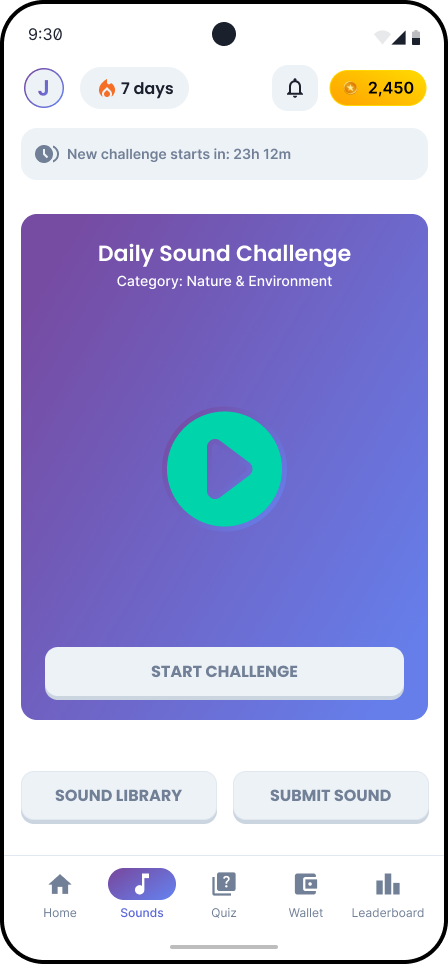
Flow 2: Sound Challenges
- Sound Home → Browse daily challenges and sound library
- Daily Challenge Start → Introduction to today's mystery sound
- Sound Playback → Listen to audio (up to 3 plays)
- Answer Selection → Choose between text input or MCQ
- Hint System (Optional) → Watch ad for clues
- Result & Explanation → See if correct, learn about the sound
- Coins Earned → Receive reward (50 base, 30 with hints, 10 consolation)
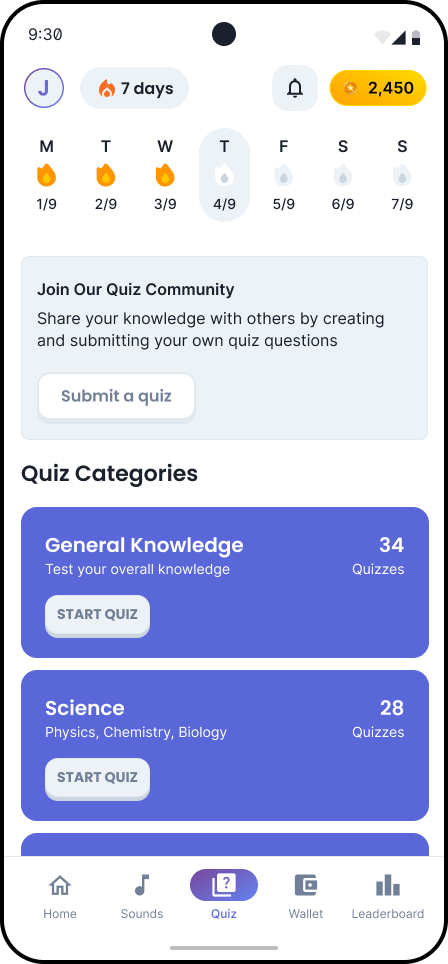
Flow 3: Quiz Challenges
- Quiz Home → View streak, submit a quiz, and categories
- Category Selection → Pick from available study categories
- Quiz Start → See quiz details (questions)
- Question Loop → Answer MCQ with 30s timer per question
- Progress Through Quiz → Track completion (1/10, 2/10, etc.)
- Results Summary → Score, breakdown, correct/incorrect answers
- Rewards & Level Up → Earn coins, XP, maintain streak
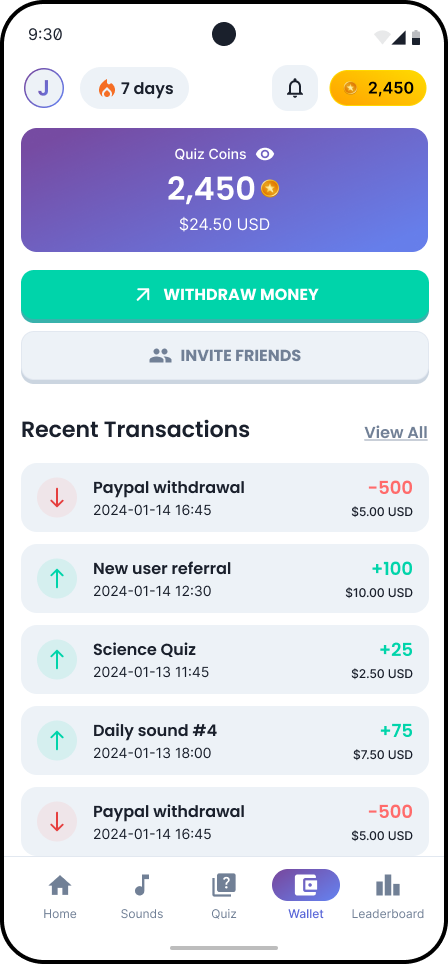
Flow 4: Wallet
- Wallet Home → Current balance, transaction history
- View Transactions → Detailed earning/spending log
- Referral → Invite friends and earn 50 coins for each who joins using the code
- Withdrawal Options → Choose payment method (PayPal, Gift Cards)
- Enter Amount → Input withdrawal amount (minimum threshold)
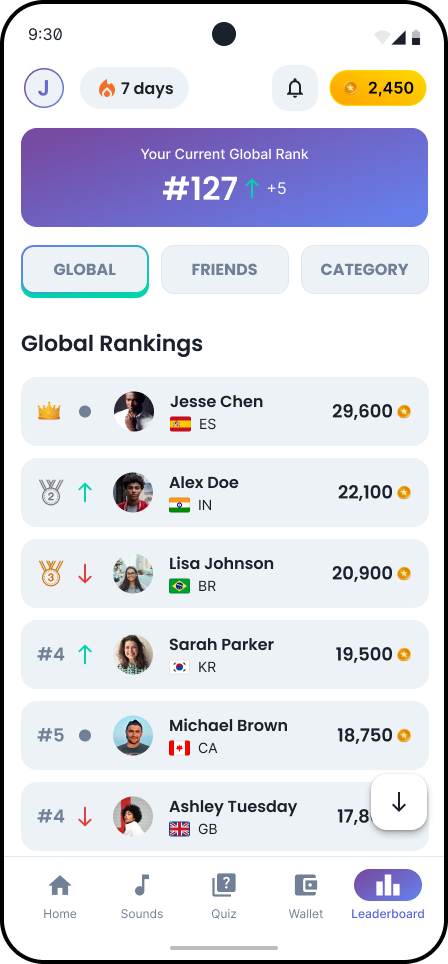
Flow 5: Leaderboard
- Leaderboard Home → Rankings view
- Filter Options → Switch between Global/Friends/Category
- View Rankings → See top players, their stats
- Your Rank → Highlighted position in current view
Conclusion
Thank you for taking the time to explore the journey process in designing the app.
Go back to all projects
Let’s work together, reach out and I’ll get back to you soon!
Send email
Download Resume